Compliance Rules
The Manage Compliance Rules sub-module enables administrators and compliance officers to define, review, and enforce regulatory and internal compliance rules for international money transfers. These rules govern how transactions are processed based on various risk and KYC/AML parameters—ensuring that HelloMe Money adheres to cross-border regulatory obligations and internal risk frameworks. This system supports rule-based logic for evaluating transactions based on countries involved, remitter and beneficiary details, payment methods, and other metadata critical for risk assessment and compliance filtering.
1.
Transaction Rule Filter Fields & Descriptions
| Field | Description |
|---|---|
| Sending Country | Origin country of the transaction. |
| Receiving Country | Destination country of the transaction. |
| Agents | Filters/rules assigned to specific agents (e.g., partners, distributors). |
| Agent Branches | Narrow rules to specific branch-level operations. |
| Delivery Methods | Methods of delivery, e.g., Bank Deposit, Mobile Wallet, Cash Pickup. |
| Payment Methods | Accepted payment options, e.g., Card, Bank Transfer, Cash, Crypto. |
| Source Currencies | Currency used by the sender. |
| Destination Currencies | Currency used by the beneficiary. |
| Period Type | Time-based logic for when rules apply (e.g., per week, per month). |
| Relationships | Sender-beneficiary relationship requirement (e.g., Family, Business). |
| Source of Income | Income declaration by sender (e.g., Salary, Business, Inheritance). |
| Sending Purpose | Reason for remittance (e.g., Education, Medical, Gift, Business). |

2.
| Column | Description |
|---|---|
| Sending Country | Originating country for the rule. |
| Receiving Country | Target country. |
| Description | Short description of the rule. |
| Delivery/Payment | Delivery and payment channel combinations the rule affects. |
| Period | Duration or frequency of rule enforcement (e.g., weekly, monthly, or transaction volume-based). |
| Remitter | Rules specific to sender profile or classification. |
| Beneficiary | Rules tied to the recipient's identity or relationship. |
| Documents | Indicates if document uploads are required (e.g., ID, proof of income). |
| Outcome | Specifies action taken when a rule is matched (e.g., Allow, Block, Review). |
| Action | Admin tools for editing, disabling, or removing the rule. |
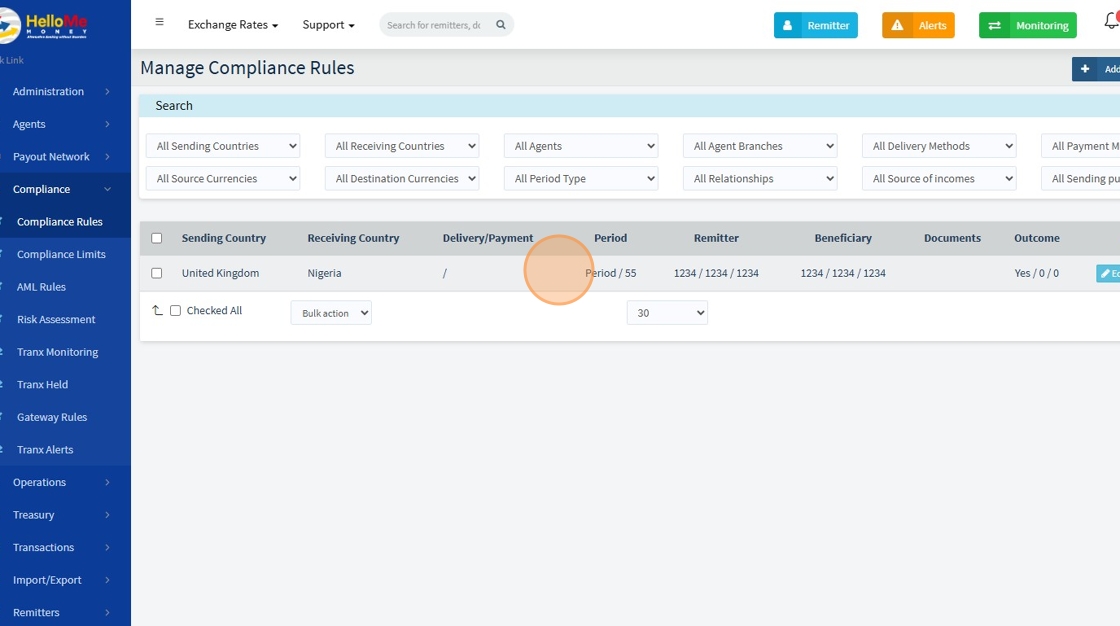
3. Click "Add Compliance Rule" To create another Rule

4.
🔐 Remitter & Beneficiary Limitations
🧾 Remitter Limits
| Field | Description |
|---|---|
| Max Source Amount Limit | Total value the sender can send over the rule period. |
| Max Send Transactions Count | Total number of transactions allowed by the sender. |
| Max Beneficiaries Count | Maximum number of recipients the sender can send to. |
👤 Beneficiary Limits
| Field | Description |
|---|---|
| Max Destination Amount Limit | Cap on total funds a beneficiary can receive. |
| Max Receive Transactions Count | Cap on how many transactions a beneficiary can receive. |
| Max Remitters Count | Maximum number of different senders per beneficiary. |
These controls help detect structuring, smurfing, and abnormal usage behavior.
📄 Document Requirements
Admins can specify required documentation for the rule to pass:
- ✅ Proof of Identification
- ✅ Proof of Address
- ✅ Source of Wealth
- ✅ Source of Funds
- ✅ Risk Assessment
- ✅ Business Documents
📌 When enabled, the system will require users to upload these before the transaction can proceed.
⏱️ Rule Period & Weight Settings
| Field | Required | Description |
|---|---|---|
| Period Type | No | Defines how the period is calculated (e.g., Rolling Days). |
| Period Value | Yes | Duration (in days) over which the limits are calculated. |
| Single Alert in Period | No | If "Yes", only one alert is generated during the rule’s period window. |
Example: If
Period Value = 55, remittance behavior is evaluated over the last 55 days for compliance.
🚨 Rule Outcome & Enforcement
| Field | Required | Description |
|---|---|---|
| Fail Message | ✅ Yes | Message shown to the user if their transaction violates the rule. |
| Review Failed Transaction | ✅ Yes | If "Yes", failed transactions go to manual review instead of being blocked. |
| Status | ✅ Yes | Set to "Active" or "Inactive" to enable or disable the rule. |
⚠️ Important: If
Review Failed Transaction = No, the system will automatically block the transaction.

📘 Example Use Case
A compliance officer wants to enforce the following rule:
- 🇬🇧 Limit UK to Nigeria transfers
- 💷 Only allow up to £1,000 total sent per remitter within 30 days
- 📄 Require ID and Source of Funds documents
- 🚨 Flag excess transfers for manual review
⚙️ Rule Configuration
| Setting | Value |
|---|---|
| Sending Country | United Kingdom |
| Receiving Country | Nigeria |
| Max Source Amount | 1000 GBP |
| Period Type | Rolling |
| Period Value | 30 (days) |
| Required Documents | Proof of Identification, Source of Funds |
| Outcome Message | "Transaction exceeds regulatory limits" |
| Review Failed Transaction | Yes |