Users
The User Management Sub-Module
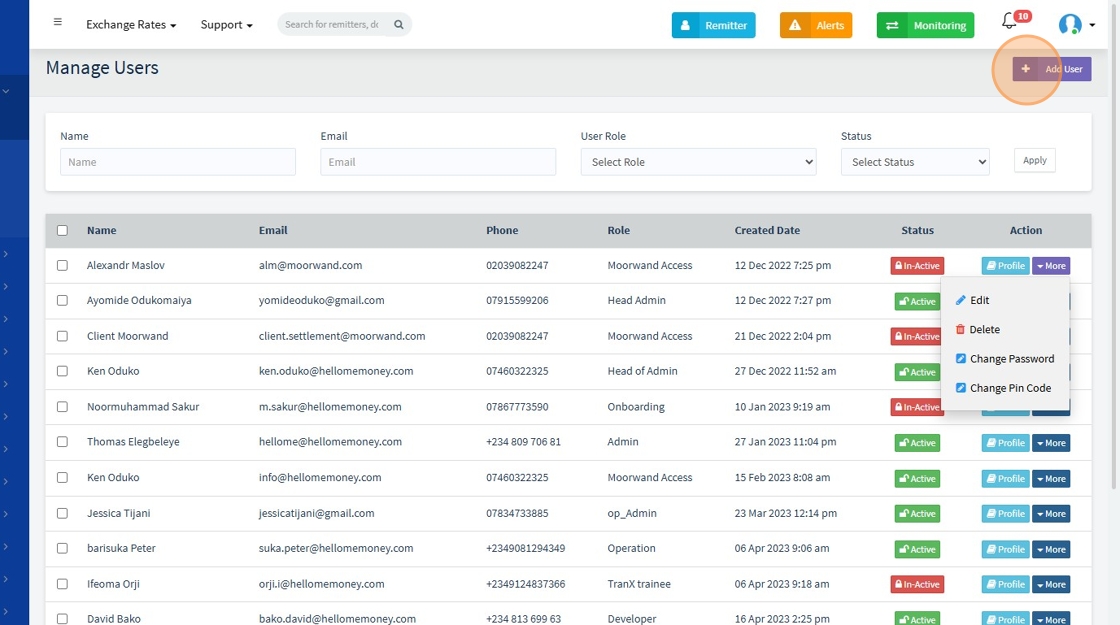
The User Sub-Module in the Administration panel allows HelloMe Money admins to manage internal users—view profiles, assign roles, enforce security, and track activity. It includes filters for quick search, an action menu for updates or deletions, and detailed user profiles with login and audit history. This ensures secure, compliant, and efficient internal access control.
1. User Management overview

2. Search for a user by name, email, phone number, role, or status, then click "Apply" to filter the results.

3. You can set user status to "active" or "inactive"

4. The "More" button lets you perform quick operation on the user

5. Click "Add" to add a new user
6. For added security, the system allows IP check to be enabled on user accounts. When “Is IP Check Enabled” is active, the system saves the user's IP address and uses it to verify future logins. If a login attempt comes from a different IP, it is flagged as suspicious to prevent unauthorized access or impersonation. This ensures that only recognized devices or networks can access the account.
When "Is Authenticator enabled" is clicked, the system enforces 2fa for the user
