Exchange Rate Margins
✅ Purpose
The Manage Exchange Rate Margins sub-module allows administrators to define margins (markups or markdowns) that are applied on top of the base exchange rate for currency conversions between countries.
This is critical for:
- 💰 Managing profit margins across corridors
- 📉 Adjusting for market volatility
- 🌍 Creating custom exchange rates based on country and currency pairs
These margins directly influence the rate end-users see when sending money. For example, if the interbank rate is 1.20 and you apply a +0.02 margin, the user sees 1.18 as the rate.
1.
| Column | Description |
|---|---|
| Sending Country | The country where the transaction originates |
| Receiving Country | The country where the transaction is going |
| Sending Currency | The system dynamically detects currency for the selected sending country |
| Receiving Currency | The system dynamically detects currency for the selected receiving country |
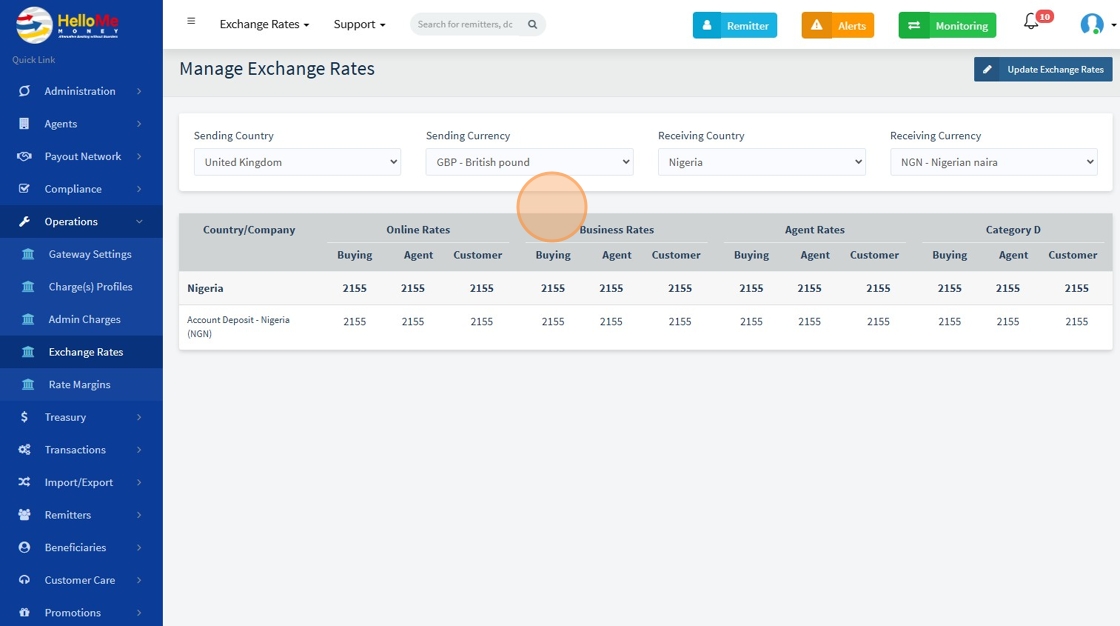
2. Click " Update Exchange Rates" to modify exchange rates

3. You can now modify the Buying rate for Online, Business, and Agent categories, including adjustments based on Customer Category.

⚠ Please note that if you select a sending country but do not specify a receiving currency, the system will automatically retrieve all rates from other countries to the receiving country’s currencies.