Service Charge
📌 What are Bank Service Charges?
In HelloMe, Bank Service Charges are the fees that are applied when processing different types of banking transactions. These can vary based on:
- The country involved,
- Whether the transaction is incoming or outgoing,
- The amount range,
- Whether the charge is a flat fee or a percentage of the transaction amount,
- The payment provider handling the transaction.
For example:
- Charging a 2% fee on outgoing payments above $500.
- Charging a flat fee of $2 for incoming payments under $300.
✅ Purpose of Service Charges
This module lets admins:
- View all existing service charges in one place.
- Filter charges by country, provider, type, amount range, and status.
- Ensure the right fees are set up for each transaction scenario.
- Update or remove charges as needed to keep fees accurate.
📋 Filters — How to Find a Charge
Admins can search or filter bank service charges using:
| Filter | Description |
|---|---|
| Provider | Filter by the payment provider (e.g., Tribe). |
| Country | Filter charges by the country they apply to. |
| Charges Types | Filter by whether the charge is a flat fee or percentage. |
| Transaction Type | Filter by transaction direction — e.g., incoming or outgoing. |
| Status | Filter by whether a charge is Active or Inactive. |
Click Apply to run the filter or Reset to clear filters.
📊 Bank Service Charges Table — Column Details
| Field | Description |
|---|---|
| Country | The country the charge applies to. |
| Transaction Type | Whether the charge is for incoming or outgoing transactions. |
| From Amount | The minimum transaction amount the charge applies to. |
| To Amount | The maximum transaction amount the charge applies to. |
| Charges Type | Whether the fee is a flat amount or a percentage. |
| Charges Amount | The value of the fee — e.g., $2 flat, 15% of the transaction. |
| Provider | The payment provider managing the transaction (e.g., Tribe). |
| Status | Shows if the charge is Active or Inactive. |
| Action | Click Edit to update charge details or Delete to remove the charge. |
✅ What Happens When an Admin Clicks Edit?
- The selected charge opens in Edit mode.
- The admin can update details like country, type, amount range, charge type, charge amount, status, or provider.
- Once saved, the updated charge will apply to new matching transactions.
🗑️ What Happens When an Admin Clicks Delete?
- The selected charge is removed from the list.
- The system will no longer apply that fee to new transactions matching that scenario.
- Deleting does not affect transactions that have already been processed.
✅ Use Case
Example scenarios:
- You want to charge a 2% fee on outgoing payments from Australia above $300.
- You want to charge a flat $66 fee for outgoing payments from Micronesia between $105–$390.
- You want to quickly update or remove a charge if local laws or costs change.
Create Bank Service Charges
📌 What is this for?
The Create Bank Service Charges form lets admins add new fee rules for specific countries, amounts, and transaction types.
This keeps HelloMe flexible and compliant with local and provider-specific fee structures.
✅ Required Fields
To create a new bank service charge, the admin must fill:
| Field | Description |
|---|---|
| Country | Select the country the fee applies to. |
| Transaction Type | Choose whether it’s incoming or outgoing. |
| From Amount | Minimum transaction amount for the fee. |
| To Amount | Maximum transaction amount for the fee. |
| Charges Type | Select if it’s a Flat amount or Percentage. |
| Charges Amount | Enter the fee value (e.g., $2 or 15%). |
| Status | Set the fee as Active or Inactive. |
| Provider | Select the payment provider handling this charge. |
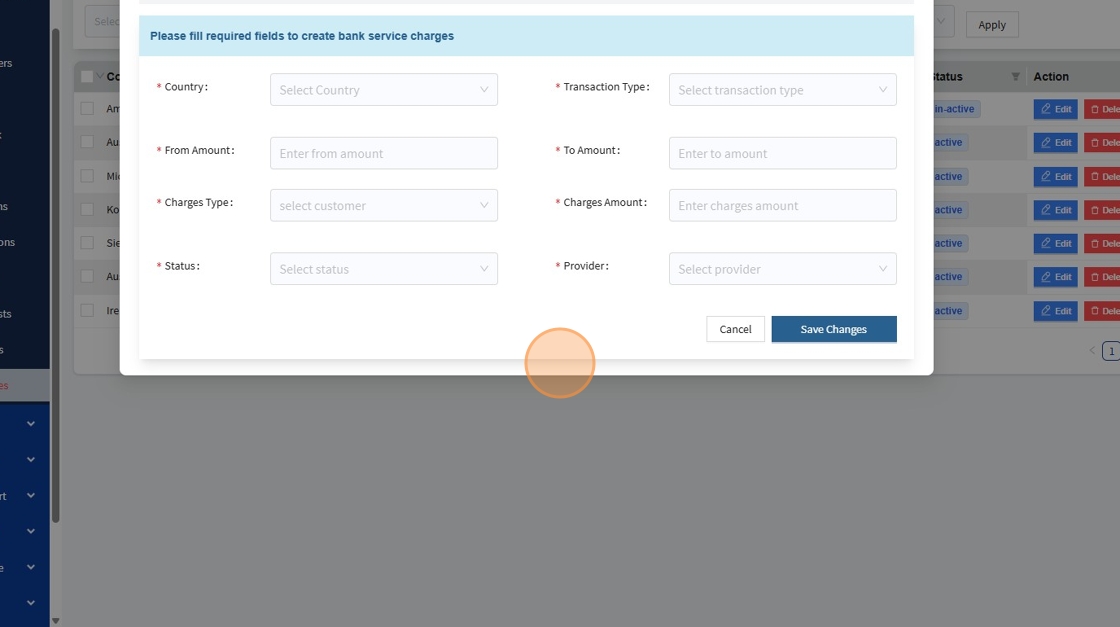
✅ How it Works
1️⃣ Fill in all required fields to define the charge rule.
2️⃣ Save the new charge.
3️⃣ The new charge appears in the Manage Bank Service Charges table.
4️⃣ The system automatically applies the correct fee whenever a matching transaction is processed.
📌 Example
- Country: Australia
- Transaction Type: Incoming
- From Amount: 200
- To Amount: 300
- Charges Type: Flat
- Charges Amount: 2
- Status: Active
- Provider: Tribe
This means: Any incoming payment to Australia between 200 and 300 AUD will be charged a flat fee of 2 AUD by Tribe.
✅ Key Points
- Charges ensure the platform covers processing costs and stays profitable.
- Only
Activecharges apply to transactions. - You can edit or delete charges anytime to match changes in policy or costs.