Promo Codes
🔰 Overview
The Promo Codes sub-module, under the Promotions Module, enables HelloMe Money to create, manage, and monitor promotional discount codes for remitters using the platform. It is a core part of HelloMe’s strategy to attract new users, reward loyalty, and drive repeat transactions, especially in highly competitive corridors (e.g., GBP → NGN).
🔰 Promo Code Homepage Filters
The Promo Codes homepage provides useful filters to help admins quickly find, review, and manage promo codes:
| Filter | Purpose |
|---|---|
| Promo Code | Search by specific code (e.g., 202GBP405) |
| Status | Filter by Active or Inactive codes |
| Tenant | Filter by specific tenant or view all |
| Country | Filter by remittance corridor (e.g., UK, UAE) |
| Type | Filter by Promo Code Type (e.g., Single Use, Multiple Use) |
| Valid Until | Filter by expiry date to find soon-to-expire or expired codes |
Using these filters helps admins manage large volumes of promotions with ease.
🔰 Promo Code Table View
| Column | Meaning |
|---|---|
| Code | Unique promo code |
| Type | Single-use or multi-use |
| Discount | Discount type and amount (e.g., Flat / 2.5) |
| Valid Until | Expiration date |
| Tenant | Targeted tenant |
| Country | Country restriction |
| Status | Whether it’s usable now |
| Action | Edit or deactivate |

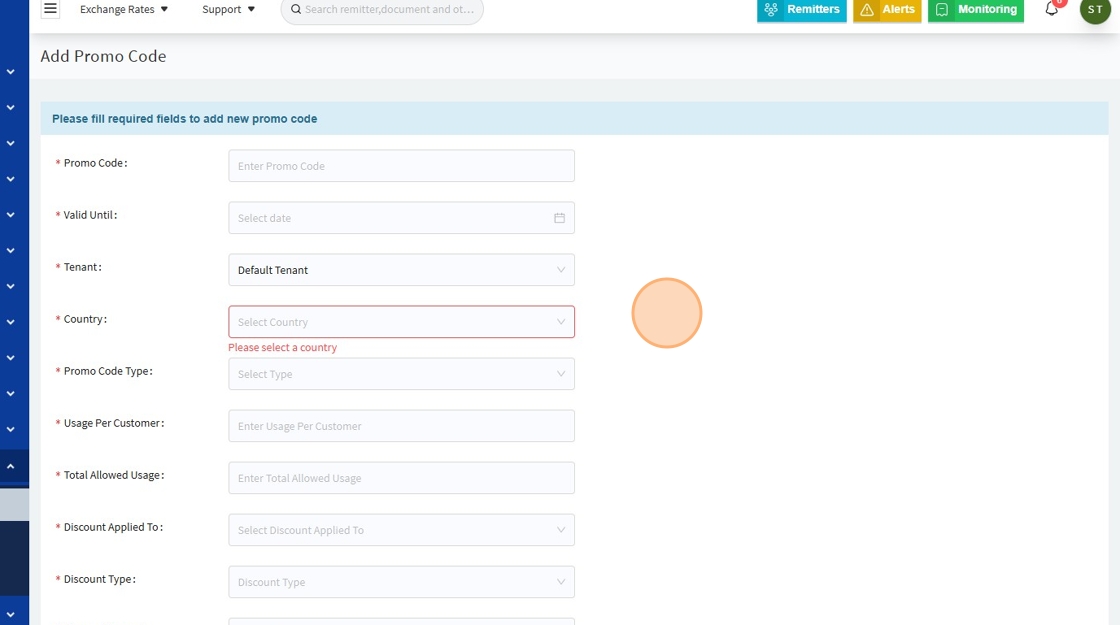
➤ When Adding or Editing a Promo Code
| Field | Description |
|---|---|
| Promo Code* | Unique identifier (e.g., 202GBP405) |
| Valid Until* | Expiry date for code usability |
| Tenant* | Applies to a specific tenant or all tenants (for global campaigns) |
| Country* | Limits the promo to specific remittance corridors (e.g., UK only) |
| Promo Code Type* | Options: Single Use, Multiple Use, etc. |
| Usage Per Customer* | Maximum times a single customer can use it |
| Total Allowed Usage* | Global maximum usage cap before auto-expiry |
| Discount Applied To* | Defines what the discount affects: Service Charges Only, Total Amount, etc. |
| Discount Type* | Flat (e.g., £2.5 off) or Percentage (e.g., 10%) |
| Discount Amount | Value of the discount based on the type |
| Status | Active or Inactive (toggle availability) |
➤ When Editing a Promo Code
When you click Edit, you can update:
| Editable Field | What You Can Change |
|---|---|
| Promo Code | Update the code name if needed (rarely changed to avoid confusion) |
| Valid Until | Extend or shorten the expiry date |
| Tenant | Change which tenant(s) the code applies to |
| Country | Adjust geographic restriction (e.g., expand to new corridors) |
| Promo Code Type | Switch between Single Use or Multiple Use |
| Usage Per Customer | Change the max uses per customer |
| Total Allowed Usage | Increase or reduce the total global usage cap |
| Discount Applied To | Specify what the discount affects (service charge, total, etc.) |
| Discount Type | Switch between Flat or Percentage |
| Discount Amount | Update the value of the discount |
| Status | Activate or deactivate the promo code instantly |
✅ Tip: Any changes made to an active promo code take effect immediately once saved.

Why Edit Promo Codes?
- To extend a successful promo that is performing well
- To adjust limits to better control promotional budgets
- To fix an error (e.g., wrong discount amount)
- To reactivate or deactivate based on campaign needs
🔰 How It Ties into the HelloMe Money Ecosystem
| Module Connection | Function |
|---|---|
| Transactions | Promo codes automatically apply at checkout, reducing costs or fees |
| Push Notifications | Notify users of new active promo codes |
| Customer Care | Agents can issue codes manually to resolve complaints or retain users |
| Analytics & Reports | Track promo usage trends to measure campaign success |
| Wallet / Billing | May optionally reflect discount history in wallet statements (if integrated) |
🔰 Strategic Impact on the Product
| Layer | Role |
|---|---|
| Customer Acquisition | Attracts first-time senders with instant discounts |
| Retention | Multi-use promos reward repeat users and build trust |
| Tenant Campaigns | Tenants can run separate promo initiatives (e.g., UAE vs. UK) |
| Geographic Targeting | Limit to specific remittance corridors where competition is high |
| Marketing Integration | Works with push notifications, SMS, and email to promote codes |
| Compliance-Friendly | Limits prevent abuse and stay within regulatory discount practices |