Manage Beneficiary
What or Who Is a Beneficiary?
In the HelloMe Money ecosystem, a beneficiary is the person or entity receiving funds sent by a remitter. Remitters is a payer who initiate cross-border transfers for family support, bill payments, or business transactions, while beneficiaries are the recipients in the destination country (e.g., receiving NGN from someone sending GBP).
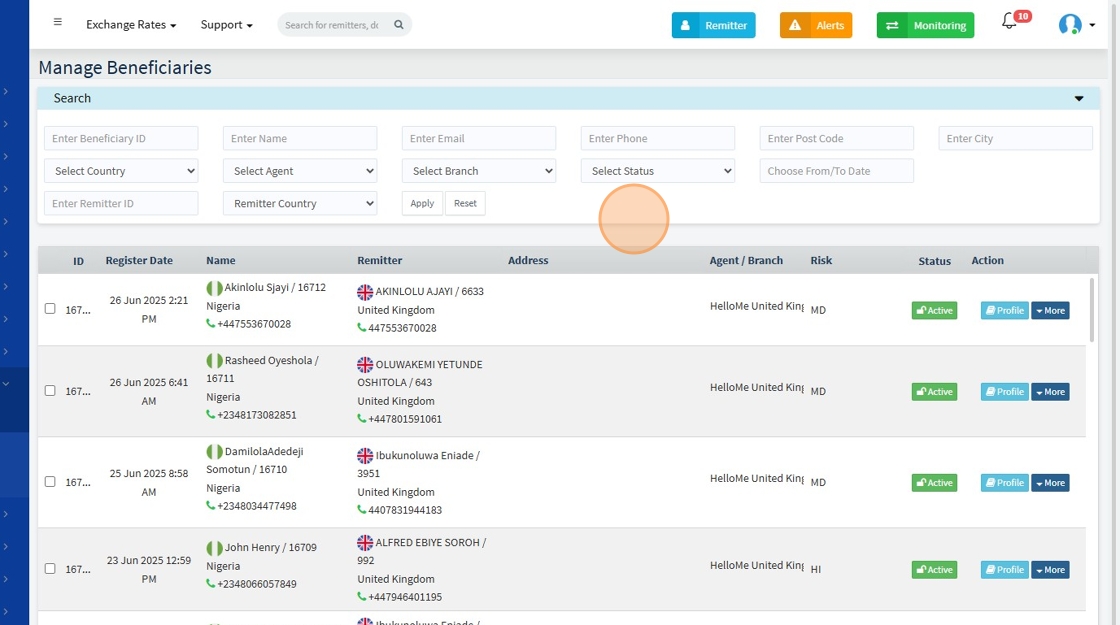
The Manage Beneficiaries sub-module enables operations, compliance, and support teams to search, review, and manage all registered beneficiaries on the platform efficiently.
🔍 Search & Filter Options
Admins can filter beneficiaries using:
- Beneficiary ID
- Name
- Email, Phone, Post Code, City
- Country
- Agent / Branch
- Status (Active, Blocked, Watched)
- Registration Dates
- Remitter ID (to trace who added the beneficiary)
- Remitter Country
📊 Main Listing Table
| Field | Description |
|---|---|
| ID | Unique identifier for the beneficiary |
| Register Date | When the beneficiary was added to the system |
| Name | Full name and ID of the beneficiary |
| Remitter | Associated remitter’s full name and ID |
| Address | Address or location of the beneficiary |
| Agent / Branch | HelloMe agent or branch that registered the record |
| Risk | Risk score or level (e.g., Low, MD, HI) |
| Status | Active / Blocked / Watched |
| Action | Options to View, Edit, Delete, or take further actions |
🛠️ Available Admin Actions
Admins can:
- Edit: Update beneficiary details
- Delete: Remove the beneficiary (typically if unlinked/inactive)
- More: Perform advanced actions such as blocking, watching, exporting data, or re-verifying beneficiary details
1.
👤 Profile View – Beneficiary Profile
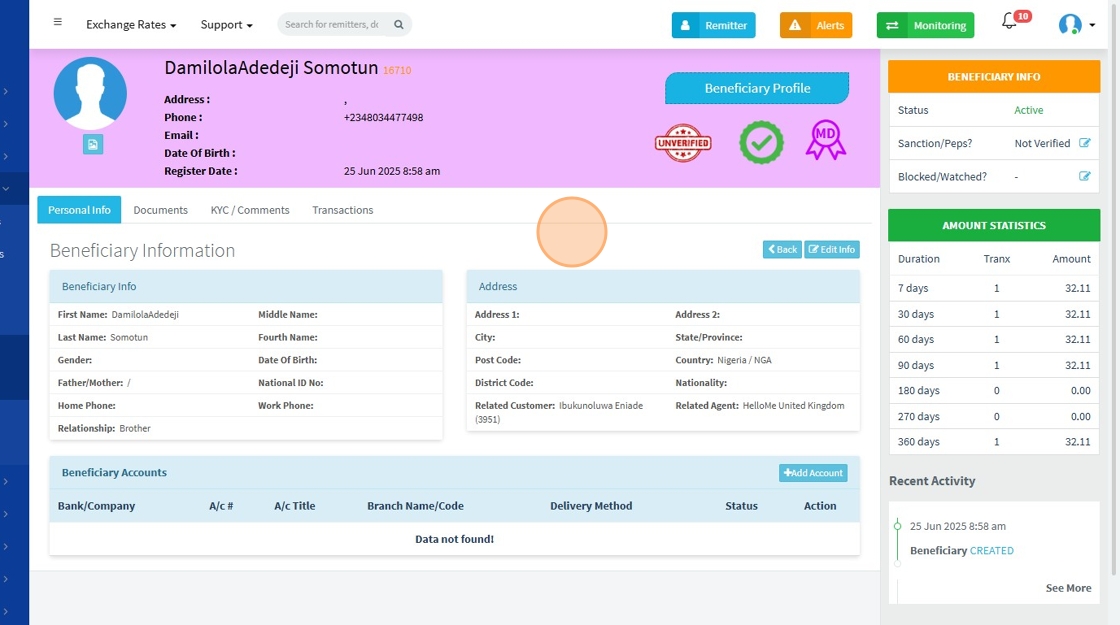
Clicking on a beneficiary opens a detailed profile view containing:
🔹 Personal Info
- First, Middle, Last, Fourth Name
- Gender
- Date of Birth
- Relationship to remitter (e.g., Brother, Friend)
- National ID / Verification Number
- Address & Contact Information
- Related Remitter & Agent
🔹 Beneficiary Accounts Tab
Displays payout accounts tied to the beneficiary.
In this case:
“Data not found!”
indicating no payout accounts have been added for this beneficiary yet.
If present, this section would display:
- Bank/Company
- Account Number
- Account Title
- Branch Name/Code
- Delivery Method (e.g., Bank, Mobile Wallet)
- Status (Active/Inactive)
- Action buttons for managing accounts.
- Admin user can also add an account manually for the beneficiary
🔹 System Info Panel
| Field | Status/Value |
|---|---|
| Status | Active |
| Sanctions/PEPs? | Not Verified |
| Blocked/Watched? | - |
This allows quick compliance checks to determine if the beneficiary is:
- Active or inactive
- Verified against sanctions/PEP lists
- On the watchlist or blocked list
🔹 Amount Statistics
Shows transaction volume patterns across different periods:
| Duration | Transactions | Amount |
|---|---|---|
| 7 days | 1 | 32.11 |
| 30 days | 1 | 32.11 |
| 60 days | 1 | 32.11 |
| 90 days | 1 | 32.11 |
| 180 days | 0 | 0.00 |
| 270 days | 0 | 0.00 |
| 360 days | 1 | 32.11 |
This helps compliance and risk teams spot unusual spikes or low-volume usage patterns.
🔹 Recent Activity
Displays a timeline of key events:
- 25 Jun 2025 8:58 am: Beneficiary CREATED
Admins can click “See More” to expand the audit trail and monitor system actions related to the beneficiary.
Just like other modules, the Manage Beneficiaries sub-module allows the admin to select multiple beneficiaries and perform dynamic bulk actions, including:
- Sending notifications to selected beneficiaries
- Sending emails directly
- Exporting their details as an Excel file
- Deleting selected beneficiaries
- etc.

🔗 How It Ties to Other Modules
| Related Module | How It Connects |
|---|---|
| Remitters | A remitter would essentially send funds to a registered beneficiary, ensuring clean sender-recipient linking |
| Transactions | All transactions involve beneficiaries, with full histories viewable in the beneficiary profile |
| Compliance (Sanctions, Risk, SAR) | Beneficiaries are risk-assessed, sanctions-checked, and can be flagged or reviewed under SAR workflows |
| Watched / Blocked Benes | Beneficiaries under investigation are escalated to these sub-modules |
| Payout Network | Beneficiary account details feed into payout systems (bank deposits, mobile wallets, etc.) |
The Manage Beneficiaries sub-module is central to HelloMe Money’s operational, compliance, and transaction workflows, ensuring accurate recipient management and compliance within the platform’s global remittance ecosystem.