Manage Formats
The Manage Payout Export Formats sub-module is part of the IMPORT/EXPORT module in the HelloMe Money Admin Panel. It allows system administrators and operations staff to configure how transaction data is exported to payout partners in structured formats such as Excel (.xlsx) or CSV.
This feature ensures payout partners receive data in the exact format required to process disbursements efficiently and accurately.
🔰 Key Features
1. Search and Filter Tools
Admins can:
- Filter by:
- Format Name
- Payout Partner
- Format Type
- Format Option
2. Export Format Management Table
Each row in the table displays:
- Format Name
- Payout Partner
- Format Type (e.g., Excel)
- Format Option (e.g., .xlsx)
- Actions (Edit Delete)

✏️ Edit Export Format
When editing an existing export format:
- Previously configured values such as Format Name, Payout Partner, and Format Type/Option are pre-filled.
- Admins can modify the selected fields by adding or removing data fields from the data set.
Example (Edited Format):
- Format Name: FCMB
- Partner: HelloMe Global
- Selected Fields Include:
- Reference Number
- Beneficiary Full Name
- Delivery Company Name
- Beneficiary Account Number
- Payout Amount
- Remitter Full Name
- Delivery Method Code
✅ Selected Fields
Definition: A custom, user-defined subset of fields that are chosen (dragged) from the Available Fields list to be part of the final export file.
✅ Available Fields
Definition: The full list of all possible transaction-related data points that can be used in an export format.

➕ Create New Export Format
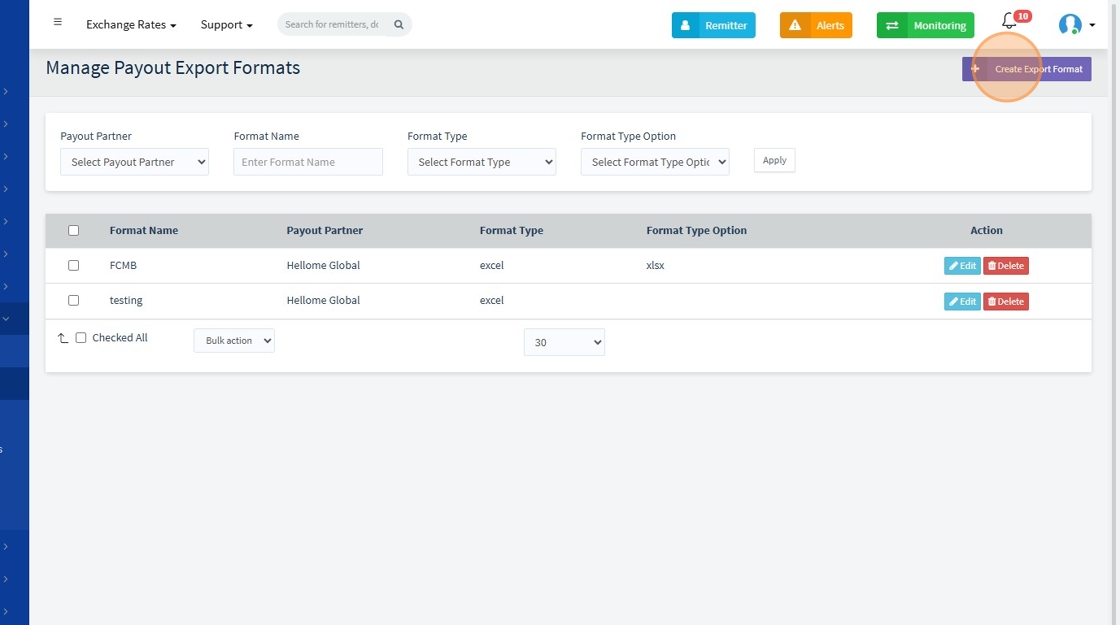
When the "Create New Payout Export Format" button is clicked:
-
Users must provide:
- Format Name
- Payout Partner
- Format Type
- Format Type Option
- Transaction Type
✅ Format Type: The general category or structure of the export file. ✅ Format Type Option: Indicates the file extension or subtype used when the file is generated and shared.
-
Available transaction fields appear under the "Transaction Data Set" section.

Admins can drag and drop from Available Fields (e.g., Transaction ID, Reference Number, Payout Amount, Remitter Full Name) to Selected Fields, which determines the structure of the final export file.
✅ Only Selected Fields will appear in the final export file that is sent or shared with the payout partner.
🗂️ Available Fields (Comprehensive Dataset)
-
Transaction Info: Agent Id, Transaction Id, Branch Id, Tenant Id, Agent Reference Number, Payout Partner Ref Number, Transaction Type, Payment Method code, Source Country Iso Code, Source Currency Iso Code, Destination Currency Iso Code, Destination Country Iso Code, Promo Code Used, Referral Code Used, Status, Sale Rate, Purchase Rate, Branch Rate, Due Amount, Service Charges, System Service Charges, Payment Processing Charges, Sending Purpose Code, Source Of Income Code, Total Due Amount, Total Paid Amount, Balance Amount, Incentive Amount, Discount Amount, Settlement Rate, Settlement Currency Iso Code, Settlement Amount
-
Remitter/Beneficiary Details: Remitter Id, Remitter First Name, Remitter Middle Name, Remitter Last Name, Remitter Fourth Name, Remitter House Number, Remitter Street Address, Remitter City, Remitter Post Code, Remitter Phone, Remitter Date of Birth, Beneficiary Id, Beneficiary First Name, Beneficiary Middle Name, Beneficiary Last Name, Beneficiary Fourth Name, Beneficiary Relation Code, Beneficiary Address, Beneficiary Address 2, Beneficiary City, Beneficiary Country Iso Code, Beneficiary Phone, Beneficiary Account Title, Beneficiary IBAN Number, Beneficiary Routing Number, Beneficiary National Id
-
Payout/Delivery Company Info: Payout Partner Id, Payout Partner Amount, Payout Partner Rate, Payout Company Id, Payout Company Name, Payout Company Location Id, Payout Company Location Name, Payout Company Location Code, Payout Company Location Address, Delivery Company Id, Delivery Company Code, Beneficiary Branch Name, Beneficiary Branch Code, Beneficiary Branch Address
-
Timestamps: Paid Date, Received Date, Cancel Date, Created At
-
Device/IP Information: Device Type, Ip Address, Cancel Reason
🔗 How It Fits Into the IMPORT/EXPORT Module
This sub-module complements other tools under HelloMe's IMPORT/EXPORT umbrella, such as Partner API Settings, by defining how data is transmitted to external systems.
- Partner API Settings handle automated data exchange (via push/pull APIs).
- Payout Export Formats define manual or scheduled export files that partners use to receive remittance transaction instructions.
Together, they ensure seamless, reliable integration with payout partners in both real-time and batch processes.