Mark Tranx Paid
📌 Purpose
- This sub-module displays manually selected transactions from the Forwarded Transactions page.
- It also retains data ready for the Push Notification operation.
- When a transaction status changes from Processing to Paid, the update is reflected here.
- Once marked as paid, the transaction leaves this page, effectively closing its lifecycle.
When the payout is confirmed:
- The transaction is then automatically removed from the Forwarded Transactions queue
- This confirms the transaction has been fully completed
Mark Tranx Paid Page
1.

When User Clicks "View 👁️" System shows more details about the selected transaction
2. As seen in the image below, the transaction status is now in "Processing state"
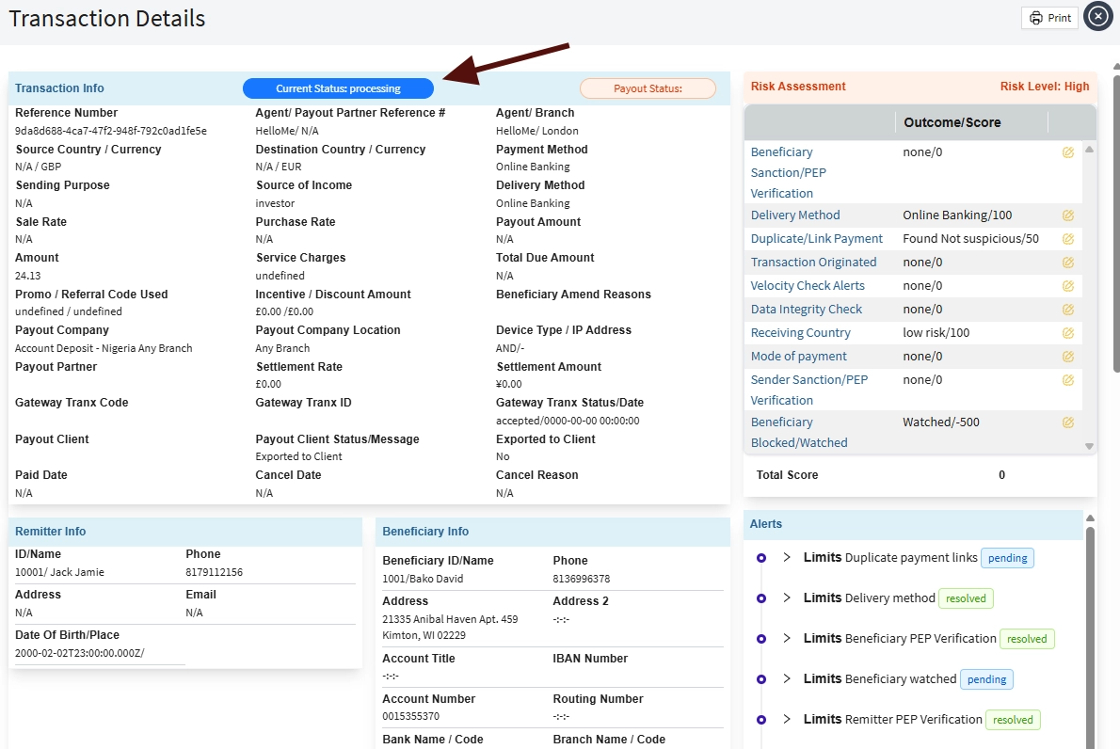
3. To forward transactions for payment in the Import/Export Push Notification module, the user should return to the Mark Tranx Paid page and manually select the transactions, as shown in the image below.

4. After selecting the transactions, the user should click on 'Mark selected as paid" as shown below.

When a transaction is marked and selected as "selected as paid" the following actions happens:
- ✅ The transaction is sent to the payment partner for the final payout to the beneficiary. It then waits for a response a response from the “Payment Partner”.
- ✅ When the response comes in as successfull, the "The Transaction status changes to paid" and it also updates the status on manage transactions page
- 📤 The transaction then leaves the "Mark Tranx paid" page.
- ✅ Admin user can also click on “Export Selected” (as shown in the screen above) to export the selected records as an Excel file.