Gateway Transactions
🔍 Overview
🎯 Purpose
- To view and audit every transaction processed via external gateway services.
- To track payment status (e.g., pending, successful, failed) and diagnose issues.
- To maintain financial control by verifying if payouts were correctly executed.
| Filter | Description |
|---|---|
| Transaction ID | Search for a specific transaction by its unique ID. |
| Status | Filter by transaction status (e.g., Pending, Success). |
| Currency | Filter by transaction currency (e.g., NGN, GHS, GBP). |
| Date Range | Choose a start and end date to filter transactions by time. |
| Gateway | Select the specific partner or gateway (e.g., Paystack). |
📋 Table Overview
The main table lists transaction details in real time. Each row typically includes:
- Transaction ID
- Gateway Name
- Currency
- Amount
- Status
- Date/Time
- Action (e.g., View)
1. Click ""
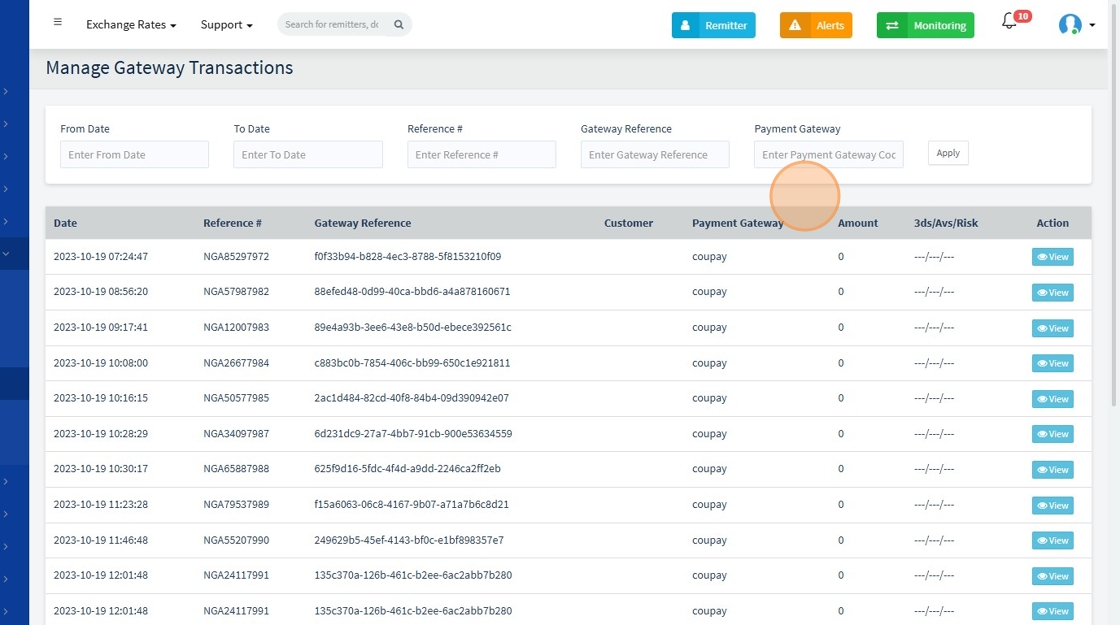
2. Click "View" To review more information about the transaction

3.
👁️ What Happens When You Click "View"
Clicking the View button on any transaction opens a detailed page showing:
- Full transaction metadata (e.g., partner response, payload, reference ID)
- API response logs
- Transaction status history
- Timestamps of each step in the transaction process
- Remarks or error messages (if any)
- Retry or escalate options (if permitted)
